SBAMakingSmall

  • Subscribe to our RSS feed.
  • Twitter
  • StumbleUpon
  • Reddit
  • Facebook
  • Digg

Monday, July 9, 2012

Will Vendors Use WPC 2012 To Announce Some New Lync Products? We’ll Keep Track Here

Posted on 5:45 AM by Unknown

wpc2012

What vendor announcements will come out of WPC around Microsoft Lync?

  • Aastra?
  • Damaka?
  • Polycom?
  • snom?
  • Others?

We’ll see who has interesting new wares and  I’ll try to keep a log of what Lync vendor press releases we see this week here on this blog article.

Lync Related Press Releases and Announcements During WPC 2012:

  • Colima SimpleRoute: Lync MSPL Gets Even Simpler: http://blog.colima.de/2012/07/next-version-simpleroute/http://blog.colima.de/2012/07/next-version-simpleroute/

  • snom at WPC: http://www.snomchannel.com/voip-blog/snom-on-the-road-microsoft-worldwide-partner-conference-update/

  • EgyptNetwork Launching 1st Video Conference Device on Top of Kinect: Click Here Click Here

  • Vidyo Demo’s Multi-Vendor, Multi-Device Video Interoperability With Lync: Click Here
  • Ferrari Electronic & Panasonic Collaborate to Help SME Customer Migrate to Microsoft Lync: Click Here
  • {Known Before} Jajah Voice for Office365: http://youtu.be/U_pFwtRoPE0
    Blog on Jajah Voice:http://windowspbx.blogspot.com/2012/06/more-details-on-lync-to-phone-features.html
  • {Known Before} Sangoma Debuts Lync Express Appliance at Microsoft WPC 2012 in Toronto http://goo.gl/2yysL
    See our blog on Sangoma Lync Express: http://windowspbx.blogspot.com/2012/06/microsoft-lync-in-one-appliance-with.html
  • West IPC MaxxConnect now Lync 2010 Certified:
    http://www.westipc.com/blog/2012/07/09/west-ip-communications-maxxconnect-sip-trunk-now-certified-to-be-compatible-with-microsoft-lync-2010/
  • Office365 Now Available Open Licensing: Partners get 23% margin first year:
    http://rcpmag.com/articles/2012/07/09/wpc-2012-office-365-partners-to-get-direct-billing.aspx
  • Known Before: Aaastra (their exsisting Lync Phone Edition and DECT devices)
    http://www.prweb.com/releases/2012/7/prweb9663498.htm
    http://www.aastrausa.com/2012-press-releases_2565.htm
  • Audiocodes:
    http://www.audiocodes.com/press-releases/audiocodes-solutions-help-accelerate-microsoft-lync-deployments-in-latin-america

NOTE: For the many people wondering, sorry, I’m not at WPC 2012. We can always connect using…Lync.my-wpc2012-presence ;-)

Read More
Posted in | No comments

Saturday, July 7, 2012

Far Side Camera Control for Microsoft Lync by Scott Hanselman via GitHub Project

Posted on 7:17 AM by Unknown

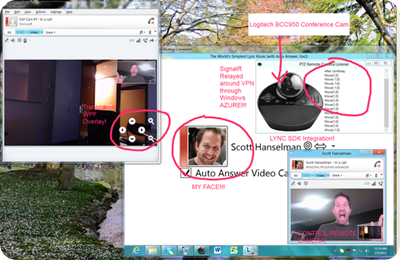
I have not had a chance to play with it yet, but it looks like Scott Hanselman has created a small .NET app that brings far end camera control to Microsoft Lync and combines ease of use, no drivers and using a device that is very affordable (Logitech BCC950 ConferenceCam).  Scott’s goal is to make a kiosk to bring himself to a remote workplace, but this concept, with modifications, could conceivably work for scott-hanselman-far-end-camera-controlstandard videoconferencing or to make a very low cost camera into a “poor man’s” meeting room device.

To the left is Scott’s visual diagram of his creation which combines .NET, SignalR, WPF and Windows Azure to achieve far end camera control. I like the use of transparent app overlaying Lync video for the camera PTZ controls: clever.

Keep an eye on Scott’s blog as he plans to write an article explaining his app in more detail when he gets a moment. Also, enjoy his quick video below on his project.

Scott’s Lync Blog Content:
http://www.hanselman.com/blog/CategoryView.aspx?category=Lync
https://twitter.com/shanselman/status/221518939027550209/photo/1

GitHub Project URL:
https://github.com/shanselman/LogitechConferenceCameraBCC950PTZSpikes

Read More
Posted in | No comments

Friday, July 6, 2012

BlueJeans Network: Cloud, Cross Vendor, Multi-Point Video Conference Service Tryout

Posted on 6:28 AM by Unknown

Blue_Jeans_Twitter_128x128

BlueJeans is inviting all to test their cloud video conferencing system so I took them up on the offer. All you need to do is give some simple information, click on a link, download plugin and…welcome! your in their test, live videoconference and can chat with the friendly meeting facilitator. Below are my notes on what I found.

My Initial Test and Notes

To initially test BlueJeans, I joined the conference using the BlueJeans browser client. This was a very simple join: click the URL, download the plugin (only first time) and your in the meeting. Once in the meeting the controls and UI felt very natural and easy to use.

In the video below I am using the BlueJeans PC web client. In the conference going on below the upper right participant is joined to the meeting using Microsoft Lync 2010 federated to the BlueJeans video call, the bottom right person is using Skype.

lync-joined-to-bluejeans-meeting2

In the above screenshot of the BlueJeans PC web interface (Beta) you notice it is pretty much a multipoint video conference. You have the participant list on the right, your own preview at the lower right and upper right you can easily mute yourself. In the lower right you can see the video layout buttons that allow you to select several layouts.

select-join-method-obscured

BlueJeans Using Microsoft Lync As an Endpoint Experience

You will get an email that has URL to join via Web/Skype/Lync/and more, click on the Microsoft Lync meeting join URL

bluejeans-lync-meeting-join-url

This will open Lync/OCS conversation window and you now click Video to join Video call. You will be presented with the below “brady bunch” video inside Lync client. The join and call experience was very smooth and worked correctly the first time.

lync-joined-to-bluejeans-meeting

Since Lync is merely showing one video stream you do not have a participant roster and call control (mute, etc) inside the Lync client, but you will notice a web page popped up when you joined that allow video control and roster. Here is some things I noticed that it provides as information and control

  • Roster of participants
  • Who is currently talking
  • How they are connected via little icon to left of there name (skype/web/lync/polycom meeting)
  • Ability to mute video or audio for yourself (and other if you are moderator)
  • Video layout/presentation

Lync-Session-Control-Via-Webpage

Notes:

  • Call control, participant roster can be controlled by web client that opens
  • No video meeting  recording
  • No Instance Message
  • No PC Collaboration, (BlueJeans is definitely Video Conferencing solution and not gunning for collaboration, ie: desksharing/powerpoint/whiteboarding at the moment)
  • Currently it is not a “Lync Certified” solution (but frankly I’m not sure if a service federating to Lync needs to be certified? If you know, comment)
  • To Use Lync and BlueJeans you need to have federation open to BlueJeans

What Does BlueJeans do for Existing Lync Users?

  • Brings “bradybunch” video to Lync today
  • VoIP video/audio meetings to iPad, iPhone and Android via Skype, Polycom
  • Have Skype/GoogleVideoChat/Lync contacts in one Video Call

BlueJeans Experience on Mobile Devices: iPad and WindowsPhone

After I saw how slick BlueJeans works on PC Web client and Lync I thought I’d take a quick spin using an iPad. I clicked on the join via Browser button from my iPad and got the below message: “Nice iPad. We normally use a browser plugin to connect you to meeting, but this technique doesn’t work on an iPad…”

ipad-responseSo I went about giving it a go using Skype. When you click to join a BlueJean video conference using Skype, the BlueJeans website asks for your Skype name. It will then send you a contact invite which you need to accept. Then you call the resulting contact to join the meeting.

This Skype mobile join did not work perfectly smoothly my first go, but I’m going to write that up as my mistake. But even allowing for that, I would say the join experience is not as smooth as from BlueJean Browser plugin and Microsoft Lync.

Maya, videoconference moderator and salesrep from BlueJeans, was very gracious and w2012-07-05 14-18-57.541e also tested joining the videoconference using Skype for WindowsPhone. This join was going over 3G in rural Pennsylvania and while there was noticeable delay (due to 3G network, not BlueJeans) the video conference worked fine.

Some Blue Jean Mobility Notes:

  • No native iPad client, and you can’t join from iPad browser, but of course you can use Skype client on iPad
  • Using Skype you need to add a BlueJeans contact to your Skype client.


My Initial Thoughts and Commentary on BlueJeans VideoConference Service

  • The Web join experience is very slick
  • The Microsoft Lync join experience is smooth, and trouble-free
  • A BlueJeans mobile client would make mobile experience much better
  • No PC collaboration (deskshare/powerpoint/whiteboarding)
  • The entry price of $399/month may bar very small businesses
  • 25 locations per call limit
  • With Office365 P1 plan going for $6/mo/user (Lync with active caller video conferencing included) may be tough going

BlueJean’s Microsoft Lync Program Manager, Raghavan Anand, also notes that BlueJeans Networks is very interested in Microsoft Lync interoperability and welcomes your input.

You can take your own testdrive of BlueJean Live Demo room 10a-2pm PST M-F at:
http://bluejeans.com/demo

Read More
Posted in lync, review, skype | No comments

Tuesday, July 3, 2012

Controlling Who Has What Access to Who In Microsoft Lync: Privacy Relationships, Whitelists, Ethical Walls, MSPL Scripts and More

Posted on 10:31 AM by Unknown

wallThe question gets asked quite often and in various different ways:

  • How can I keep 2 Lync users, or 2 groups of users, from communicating using Microsoft Lync?
  • How can I keep everyone from bothering the CEO?
  • If we federate, will just anyone bother us? How can we control this?

Microsoft Lync provides several ways to control access to yourself and others and I expect as more federation happens we will see even more 3rd party solutions (and who knows, even more features built into Lync itself?)

With traditional communications we had:

  • Do Not Call Registry
  • PBX’s often allow you to block/blacklist numbers with a star code

How do we control access in the UC world? In this blog we will cover several ways to control access in Microsoft Lync.

Privacy Relationships (Black List/User Level)

Privacy Relationships allow you to select what every Lync Contact’s access level to you is: Everything from “Family & Friends” that shows/allows everything to “Blocked Contacts” which doesn’t allow the contact to communicate with you or even see your presence. (You can still call, IM them!) Privacy Relationships are defined by the user and take effect immediately.

This is an okay method if you want each user individually manage every other user. Much like a black list, but with much more granularity.

More Detailed Blog on Privacy Relationships:
http://blogs.technet.com/b/lync/archive/2008/05/28/how-to-be-visible-to-defined-contacts-only.aspx
Also, how privacy relationship affects who can see your Calendar:
http://windowspbx.blogspot.com/2012/05/lync-user-tip-19-understanding-lync-to.html

Enhanced Presence Privacy Mode: Only Allow Those On Your Contact List to See Your Presence (White List/Admin+User Level)

With Microsoft Lync Enhanced Presence Privacy Mode you have your Lync Admin flip a switch so that only those in your Lync Contact list can see your presence. See below URL for more details:

http://technet.microsoft.com/en-us/library/gg399028.aspx

MSPL Script to Block Access at (Admin Level)

MSPL is a scripting language that allows you to do message routing and filtering. Using MSPL scripts you can centrally do quite some wizardry around controlling access by blocking or Redirecting IM/Audio/Video based on Caller, Message Content or call type.

MSPL scripts have been for the “programming minded” until Colima designed a free and very easy tool called SimpleRoute. This tool uses a very simple GUI tool to generate MSPL scripts. (the tool is 2MB, requires no installation—impressive!)

See my detailed blog on Colima SimpleRoute free/paid End User MSPL Script Creator:
http://windowspbx.blogspot.com/2012/04/masses-can-now-make-microsoft-lync-mspl.html

Another option in the MSPL route is a MSPL script by www.gotuc.com. This is a script that will block all phone numbers in a text file. You can get the script here. @TommyClarke notes that Sweden there is an API that reveals annoying numbers, click here to see his post.

Use “Ethical Walls” Using SDK or 3rd Party Lync Enhancement

Another way to centrally control access between whole groups of users is the use of an “Ethical Wall” enhancement to Microsoft Lync. Currently this is not a feature built into Lync and you will need to use the Lync SDK to write this functionality or buy one of several 3rd Party add-ons to achieve this.

Below is a list of some Ethical Wall add-ons for Lync:

  • Actiance Advantage: http://actiance.com/products/vantage.aspx
  • MultiUx Ethical Wall: http://www.multiux.com/modules/security-and-compliance/ethical-wall-for-lync-ocs-r2.html
  • Fabbricdigitale: http://www.fabbricadigitale.com/eng/business-units/unified-communications-multiux.html

Can you think of any other ways to control Lync access? If so, please comment!

Read More
Posted in Lync_HowTo | No comments

Check It Out: Scott Hanselman’s Lync 2010 Super Simple Auto Answer Video Kiosk

Posted on 6:01 AM by Unknown

image_thumb_5Scott Hanselman is working on some code to add video autoanswer capability to Lync 2010 along with far end video control using Microsoft Inbox UVC drivers. He is focusing on the new Logitech BCC950 ConferenceCam (a very interest device which I recently reviewed)

This little Super Simple Auto Answer Video Kiosk (ahem) app has some interesting uses

  • cheap room video system
  • a kind of security camera you can dial into
  • Scott’s mission: Using Lync video to connect remote workers

Scott has all the code up on GitHub, so if you want to create some really cool something or another, go get it!

Go checkout the code!
http://www.hanselman.com/blog/IntroducingLync2010SuperSimpleAutoAnswerVideoKioskWithFullScreen.aspx

Read More
Posted in lync, lync_developer | No comments

Monday, July 2, 2012

snomPhone for Mac: Mac Utility for Interacting with snom Phones

Posted on 10:31 AM by Unknown

Mac-logo

snom has a small tray app for Windows and just today I noticed that DanielHa has written a small Mac utility to interact with snom phones.

Some features noted:

  • be notified of incoming call
  • see missed call
  • return calls from deskop

Opensource:
http://code.google.com/p/snomphone/

Read More
Posted in snom | No comments

Apps and Options to Attend Microsoft Lync Meetings External and Anonymously

Posted on 5:54 AM by Unknown

lync-attendee-clients

Microsoft Certified Options:

PC via Lync Attendee:
http://www.microsoft.com/en-us/download/details.aspx?id=15755
Good blog on Attendee versus Lync Web App: http://blogs.catapultsystems.com/tharrington/archive/2010/11/08/lync-conferencing-client-comparisons.aspx

PC Via Lync Web App (SilverLight)
http://blogs.technet.com/b/lync/archive/2010/10/19/introducing-microsoft-lync-web-app.aspx

Mac via Lync Web App (SilverLight)
http://blogs.technet.com/b/lync/archive/2010/10/19/introducing-microsoft-lync-web-app.aspx

Uncertified Options:

iPad via XavyMeeting (2USD)
http://itunes.apple.com/us/app/xavymeeting/id527713571?mt=8
Review: http://windowspbx.blogspot.com/2012/06/first-impression-of-xavymeeting-lync.html

XavyMeeting for Android (1USD)
https://play.google.com/store/apps/details?id=com.damaka.ucc.XavyMeeting.ui&hl=en

You may also have interest in our Lync Mobility Solution Comparison Report:
http://windowspbx.blogspot.com/2012/06/microsoft-lync-mobility-solutions.html

Read More
Posted in lync | No comments
Newer Posts Older Posts Home
Subscribe to: Posts (Atom)

Popular Posts

  • Plantronics Calisto 620 M Review: Portable Bluetooth Speaker Phone Device For PC and Mobile
    Another interesting device has been added to the Microsoft Lync Qualified Devices list: The Plantronics Calisto 620M bluetooth speakerphone....
  • Microsoft Remote Connectivity Analyzer for Lync & #Exchange Gets Big Refresh
    New /Enhanced Exchange and Lync connectivity test sites combined Lync Mobile Autodiscover tests New Office365 DNS and Free/Busy test G...
  • Polycom Soundstation Connect: Polycom Has No Intention of Rolling Over to Other USB Speaker Phone Vendors
    With Plantronics, Jabra and Logitech well suited and churning out portable USB speaker phone devices, Polycom seems to be noting that a USB...
  • Ubiquiti Unifi Now Supports Zero-Handoff Roaming: Extremely Affordable Voice Wifi Network?
    We have been using Ubiquiti Networks very affordable Unifi access points to bring WIFI to blanket large areas. Unifi firmware version 3.02 ...
  • Lync Qualified/Comptabile and Optimized IP Phone Features Compared: Which Devices are More “Advanced”?
    I am getting more and more questions on which class of Lync devices is more “advanced”. As Lync Qualified (aka Lync Compatible/ 3PIP) devic...
  • My Lenovo Thinkpad Tablet 2 (Windows 8) Video Review
    Below is my video review of the Lenovo Thinkpad Tablet 2. My overall impression of the Tablet 2 is very good. It is a Thinkpad and looks and...
  • Free Microsoft Lync HotKey Contact Dialer App: Launch Conversation With 1 Button Touch
      Assign hot keys to Lync contact so you can Instant Message or Audio Call contacts or phone numbers with 1 hot key whether you are in Lyn...
  • Polycom CX200, aka Catalina, Is Starting Journey Into Sunset: Is Dial Pad Here To Stay?
    @jc_1875 notes that the Polycom CX200 is no longer available from suppliers in the UK and is no longer on the UK Polycom listed among the...
  • Group Call Pickup Coming to Lync Server 2013 in CU1 Update: Here’s How It Will Work
    Roy Kuntz noted in his Lync Conference 2013 “Deploying Voice” session today that Lync Server 2013 will get Group Call Pickup functionality a...
  • What Happened to Spectralink #Lync Qualified WIFI/DECT Phones? @SpectralinkCorp
    As most of us know the Spectralink WIFI/DECT phone unit was sold by Polycom and is no longer a part of Polycom. It is now here: http://www...

Categories

  • acano (1)
  • Android (3)
  • appliance (1)
  • april prank (1)
  • audiocodes (2)
  • Before_Released (1)
  • brainstorming (1)
  • CEBP (1)
  • cisco (3)
  • Commentary (3)
  • Community Question (1)
  • dect (1)
  • developer (1)
  • exchange-um (1)
  • federation (3)
  • fun (5)
  • futu (1)
  • Futurist_Ideas (4)
  • GeneralIT (2)
  • gmail (2)
  • google (3)
  • ios (3)
  • jajah (2)
  • logitech (1)
  • lync (34)
  • Lync_2013 (13)
  • Lync_2013_StepByStep (6)
  • Lync_2013_WhatsNew (2)
  • lync_developer (3)
  • Lync_HowTo (8)
  • Lync_Mobile (1)
  • LyncAdminTip (2)
  • LyncUserTip (16)
  • NET (1)
  • News (9)
  • offic (1)
  • office365 (1)
  • panasonic (2)
  • plantronics (1)
  • polycom (9)
  • Research_Ideas (3)
  • review (12)
  • sangoma (1)
  • SIP (2)
  • skype (5)
  • snom (17)
  • snom 800 (1)
  • snom_HowTo (1)
  • sonicwall (1)
  • UCWA (2)
  • videoconf (1)
  • WebRTC (4)
  • wifi (2)
  • windowsMobile (1)
  • windowsphone (5)
  • XMPP (3)

Blog Archive

  • ▼  2013 (130)
    • ▼  September (13)
      • Microsoft #Lync 2013 September 2013 Update: List o...
      • Microsoft #Lync Finally Gets #1 Requested Feature:...
      • Lync Qualified/Comptabile and Optimized IP Phone F...
      • First Picture of #Polycom CX5500 “Roundtable”IP #L...
      • Acano Brings #WebRTC Meetings & Popular Video Endp...
      • What Happened to Spectralink #Lync Qualified WIFI/...
      • #snom Releases Better Together over Ethernet UC Ed...
      • First Impression of Polycom Better Together over E...
      • Minataur V NASA Rocket Launch: My Video from Easte...
      • #Polycom Announces & Demos UC Software 5.0 #Lync F...
      • Lync 2013 Cumulative Updates List
      • #Lync Senior Product Marketing Andrew Cook: Micros...
      • Microsoft Extends TechNet Subscription for 90 Days...
    • ►  August (17)
    • ►  July (15)
    • ►  June (10)
    • ►  May (11)
    • ►  April (11)
    • ►  March (26)
    • ►  February (19)
    • ►  January (8)
  • ►  2012 (153)
    • ►  December (14)
    • ►  November (6)
    • ►  October (5)
    • ►  September (10)
    • ►  August (17)
    • ►  July (17)
    • ►  June (24)
    • ►  May (16)
    • ►  April (19)
    • ►  March (7)
    • ►  February (10)
    • ►  January (8)
  • ►  2011 (17)
    • ►  December (17)
Powered by Blogger.